Every Friday at the (fictional) commercial real estate brokerage Bridgepoint Commercial Realty, the Property Management director used to do the same thing: open three Google Sheets, copy the rows into a Google Doc, eyeball the data for anything urgent, write a summary by hand, and email it to the partners.
Two hours, every single week. Half of it was just data wrangling.
This post walks through how I replaced that workflow with a 7-node n8n pipeline that uses Claude to write the actual report. The team now wakes up to a formatted Slack message at 7AM — no one touches anything.
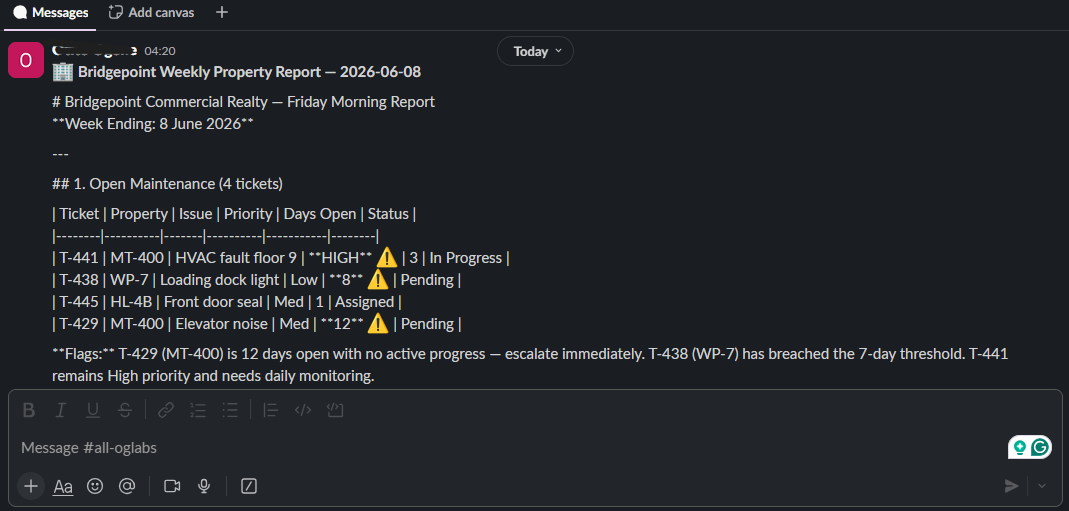
The data sources
Three tabs in a Google Sheet called Bridgepoint Weekly Ops Data:
- Maintenance Tickets —
Property,Ticket ID,Issue,Priority,Days Open,Status - Tenant Satisfaction — monthly survey results:
Property,Tenant,Score,Comment - Lease Expiries — anything expiring in the next 90 days:
Property,Tenant,Expiry Date,Sq Ft,Renewal Status
The flags that matter for the report:
| Flag | Rule |
|---|---|
| Urgent maintenance | Priority is High or Days Open > 7 |
| Low satisfaction | Score < 4.0 |
| At-risk lease | Renewal Status ≠ "Renewed" |
Could you filter these at the sheet level? Sure. But I wanted Claude to see the full dataset for context — it writes a better summary when it knows what isn't flagged too.
The workflow
Seven nodes, all wired sequentially:
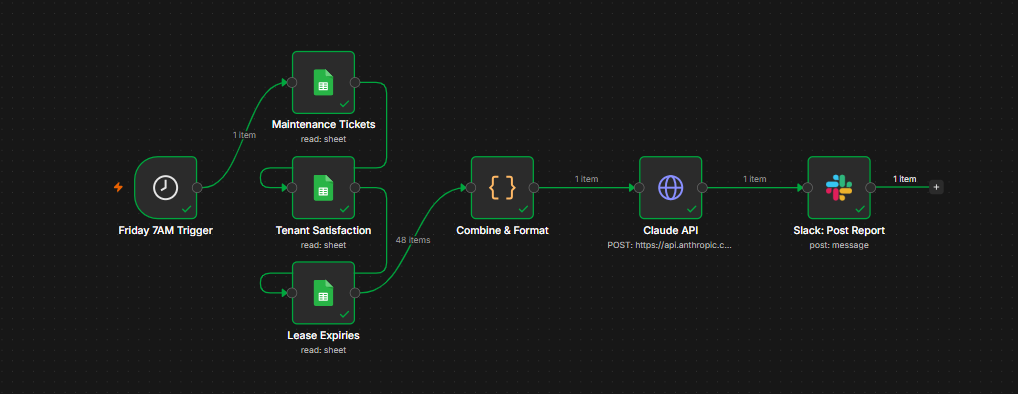
Schedule (Fri 07:00 ET)
  → Read Maintenance Tickets
  → Read Tenant Satisfaction
  → Read Lease Expiries
  → Code: combine + flag
  → Claude API: write the report
  → Slack: post to #leadership-weekly
A note on the topology: my first instinct was to fan out the three sheet reads in parallel from the trigger, then converge into the Code node. Don't do that. n8n's v1 execution order runs depth-first — the first branch completes, the Code node fires with only one upstream's data available, errors out with Node 'X' hasn't been executed, and the workflow halts before the other branches even get to run.
Chaining them sequentially is uglier on the canvas but works correctly: each sheet completes before the next runs, and the Code node only fires after all three are cached.
The Code node
This is where the data gets shaped into something Claude can reason about cleanly:
const tickets = $('Maintenance Tickets').all().map(i => i.json);
const satisfaction = $('Tenant Satisfaction').all().map(i => i.json);
const leases = $('Lease Expiries').all().map(i => i.json);

const urgentTickets = tickets.filter(t =>
  String(t.Priority).toLowerCase() === 'high' ||
  parseInt(t['Days Open'], 10) > 7
);

const lowSatisfaction = satisfaction.filter(s =>
  parseFloat(s.Score) < 4.0
);

const upcomingLeases = leases.filter(l =>
  String(l['Renewal Status']).toLowerCase() !== 'renewed'
);

return [{
  json: {
    reportDate: new Date().toISOString().split('T')[0],
    counts: {
      totalTickets: tickets.length,
      urgentTickets: urgentTickets.length,
      lowSatisfaction: lowSatisfaction.length,
      upcomingLeases: upcomingLeases.length,
    },
    maintenanceTickets: tickets,
    urgentTickets,
    tenantSatisfaction: satisfaction,
    leaseExpiries: upcomingLeases,
  }
}];
The pre-computed counts are gold — they give Claude a one-glance summary it can echo at the top of the report rather than re-counting from the arrays.
The Claude prompt
Single user-turn POST to /v1/messages with the JSON body built as an expression:
{
  "model": "claude-sonnet-4-6",
  "max_tokens": 1024,
  "messages": [
    {
      "role": "user",
      "content": {{ JSON.stringify('You are the operations analyst for Bridgepoint Commercial Realty. Generate a concise Friday morning property management report from this data. Use three sections: Open Maintenance (flag anything over 7 days open or High priority), Tenant Satisfaction (flag scores below 4.0), and Lease Expiries (flag any not yet contacted or in discussion). End with a 3-item action list for the team. Keep under 350 words. Data: ' + JSON.stringify($json)) }}
    }
  ]
}
Two gotchas with this body that ate ~30 minutes of debugging the first time:
- You can't do
"text" + {{ expr }}inside the JSON body — that's not valid JSON syntax. Wrap the whole content value in a single{{ JSON.stringify(...) }}block (with no surrounding quotes — stringify adds them). - The model name matters. n8n templates floating around the internet still reference
claude-opus-4-5and older. Use whatever's current in the Anthropic console; I'm on Sonnet 4.6 here because it's the cost/quality sweet spot for a 350-word summary.
The Slack node
The only interesting bit: pulling the reportDate from the Code node and the report body from the Claude node into one message.
*🏢 Bridgepoint Weekly Property Report — {{ $('Combine & Format').item.json.reportDate }}*

{{ $json.content[0].text }}

_Automated report — runs every Friday at 7AM EST_
$json in the Slack node refers to the immediately-upstream Claude response. To reach back to an earlier node's output you use $('Node Name').item.json.field. n8n caches every node's output for the run, so this works as long as both have actually executed.
Things I'd add if this were real production
- A Notion/Airtable archive node so partners can search past reports
- Anomaly detection on the Claude side — pass last week's report and ask "what's changed?"
- A fallback — if the Claude call fails (rate limit, API outage), still post the raw flagged items to Slack so the team isn't flying blind
- Cost tracking — log token usage from
response.usageto a sheet so I know when to optimize the prompt
For a portfolio demo, none of that is the point. The point is: the team gets the report, on time, without anyone touching it.
The bigger story
Bridgepoint also got a Claude Project for the leasing team — same fictional company, different shape of automation. Together they cover the two most common asks from mid-size operations teams: "run this without anyone touching it" (this post) and "give the whole team access to a workspace they don't have to prompt-engineer themselves" (the other one).
All the artifacts — workflow JSON, seed CSVs, system prompts — are in the bridgepoint-portfolio repo. Fork it, swap the company name, and you have a starting point for your own ops automation.