This one is a real client engagement, not a portfolio demo — a US fencing contractor who needed consistent SEO content but had no time to write, no interest in learning WordPress, and (reasonably) no appetite for letting an AI publish to their business website unsupervised.
That last constraint is what made the build interesting. Fully autonomous blogging is easy. Autonomous blogging that a business owner can trust with their brand is a workflow design problem: the machine does everything except the final decision, and the final decision has to cost the human almost nothing.
The system now drafts a blog post every weekday, grounded in the company's real search data, and the client approves or rejects each one with a single tap from their phone. They have never logged into the WordPress admin panel. (Client details are redacted in the screenshots.)
The system at a glance
Two Zaps, one webhook handshake, and Zapier Tables as the state store between runs:
Weekly:   Google Search Console data + SEMrush keyword mappings
            -> Zapier Tables (the keyword pool + topic state)

Weekdays (Mon-Fri):  DRAFTER ZAP
  Schedule trigger
    -> Tables: pick the next topic from the pool
    -> Zapier Agent: draft the post
    -> Code (JS): shape the payload
    -> Webhook POST: save as a WordPress *draft*
    -> Tables: log what was drafted (never repeat a topic)
    -> Gmail: send the approval email

Client taps a button:  PUBLISHER ZAP
  Catch Hook
    -> Path A (Approve): publish the WordPress draft
    -> Path B (Reject):  log the decision, queue a redraft
The research layer
The drafts are only worth approving if they target the right keywords, so the system starts from data rather than vibes.
Once a week, performance data from Google Search Console — which queries are actually bringing impressions and clicks — gets pulled in alongside keyword research and mappings from SEMrush. That lands in Zapier Tables, which acts as the keyword pool. The drafting agent works through that pool, so every post is tied to a real search term the business could plausibly rank for, and the Tables records track which topics have already been used so the agent never drafts the same post twice.
The drafter Zap
Every weekday morning, on a schedule:
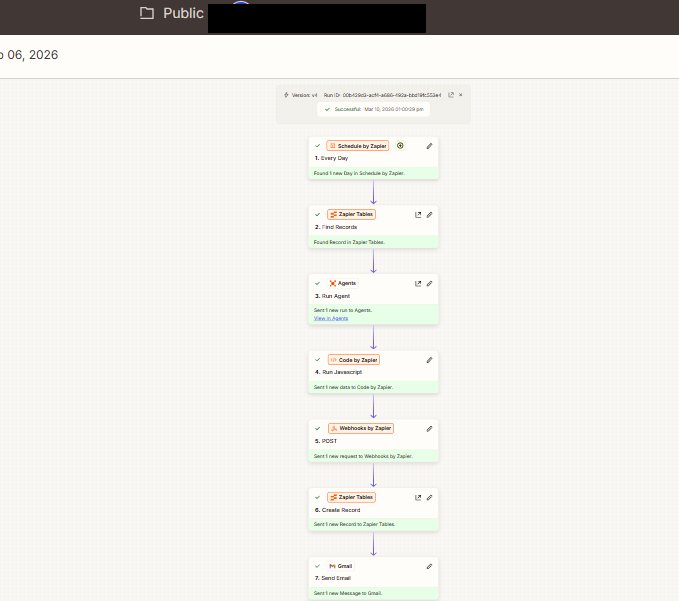
Seven steps:
- Schedule by Zapier — fires once a day, Monday to Friday.
- Zapier Tables — Find Records — pulls the next unused topic from the keyword pool.
- Agents — Run Agent — the drafting agent (it runs under a persona, "Violet", so its emails read like they come from the client's office) writes the post: title, body, meta description, and the target keyword.
- Code by Zapier — Run JavaScript — shapes the agent's output into the exact payload WordPress expects.
- Webhooks by Zapier — POST — creates the post in WordPress as a draft. This is a hard rule of the system: the agent physically cannot publish.
- Zapier Tables — Create Record — logs the topic as used, so the pool recycles correctly.
- Gmail — Send Email — fires the approval email to the client.
The approval email
This is the piece the whole design hangs on:
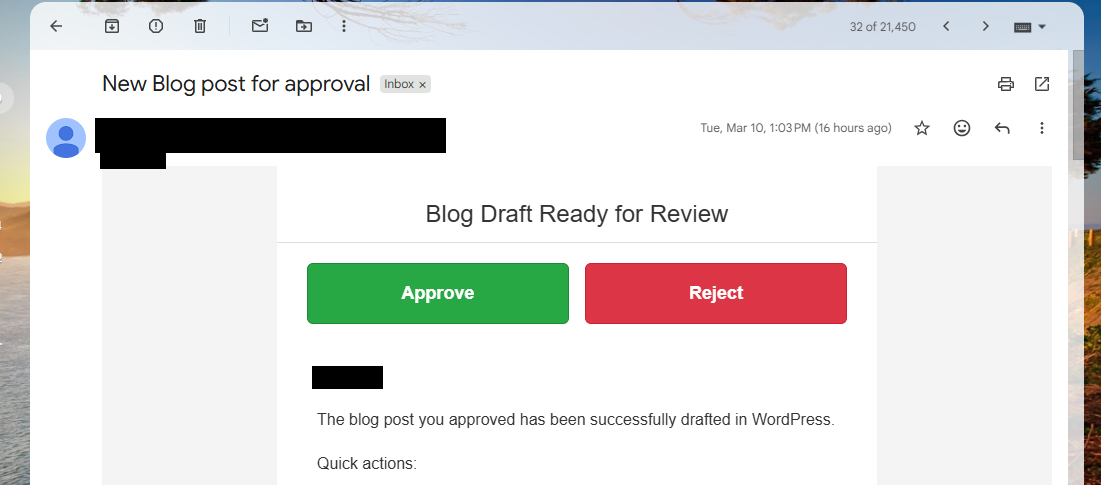
The email contains everything needed to make a decision in seconds: the post title, a snippet, the meta description, and the SEO rationale — which keyword the post targets and why it was drafted. The Approve and Reject buttons are just links; each one calls the publisher Zap's webhook with the decision and the post ID in the payload.
No login. No app. No "can you review this when you get to your desk." The client reads it on their phone between jobs and taps a button.
The publisher Zap
The second Zap catches the decision:
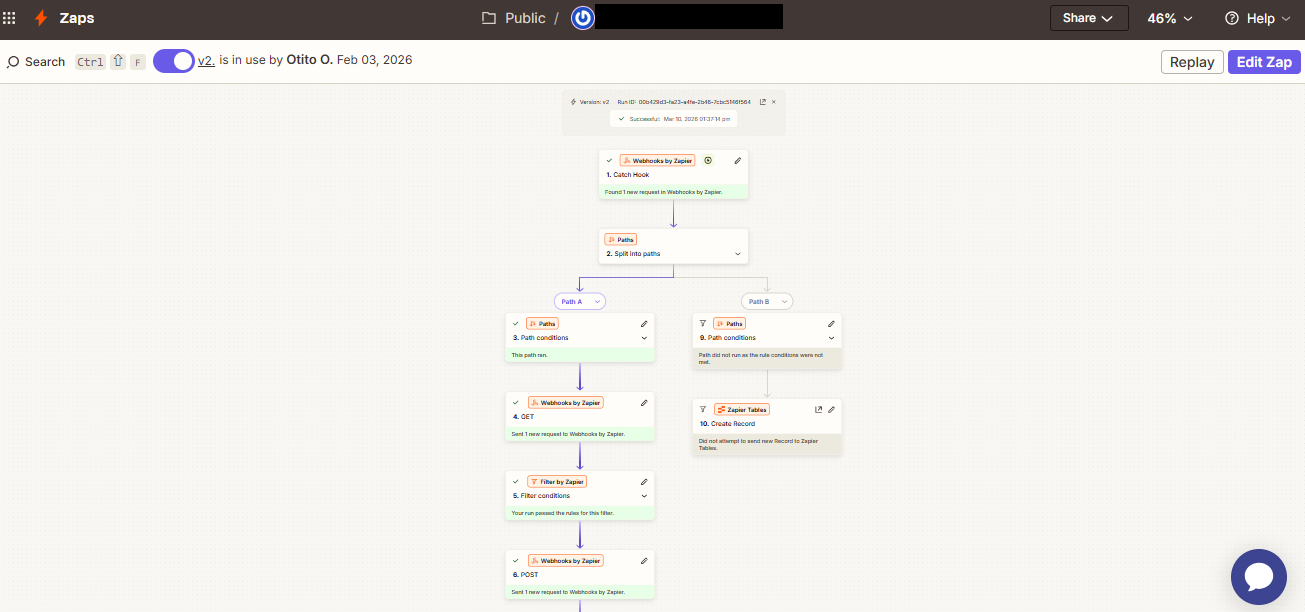
- Webhooks by Zapier — Catch Hook receives the button press.
- Paths split on the decision:
- Approve — retrieves the draft, passes it through a filter as a sanity check, and publishes it via POST.
- Reject — writes the decision back to Zapier Tables, which queues the topic for a redraft instead of losing it.
Why two Zaps instead of one
This was the part that took real working out, and it's the detail I'd put in front of anyone building a similar system.
A single Zap cannot pause and wait for a human. Zapier runs are ephemeral — they execute top to bottom and they're gone. An approval step means the workflow has to stop mid-flight, survive for hours (sometimes days) while the client gets around to their inbox, and then resume in the right direction based on the answer.
Splitting the system at the point of human decision solves all of it:
- The webhook is the boundary. The drafter Zap completes entirely — draft saved, state logged, email sent. Nothing is left "waiting." The publisher Zap only exists when the human actually decides.
- State lives in Tables, not in the Zap. What was drafted, what's pending, what's been rejected — all of it survives outside any single run, which makes every run stateless and safe to retry.
- The approval gate can't be bypassed. Because publishing lives in a separate Zap that only triggers from the webhook, there is no code path from "agent writes a post" to "post is live" that skips the client's tap. A bad generation can waste a draft, but it can never reach the site.
If you're building human-in-the-loop automation on Zapier, this is the pattern: split the automation where the human sits, and make the handoff a webhook.
Bonus pipeline: job-site photos to social content
The same client gets a second automation that reuses the same approval machinery. Their crews already photograph every job in CompanyCam — so when a photo gets tagged, it becomes content:
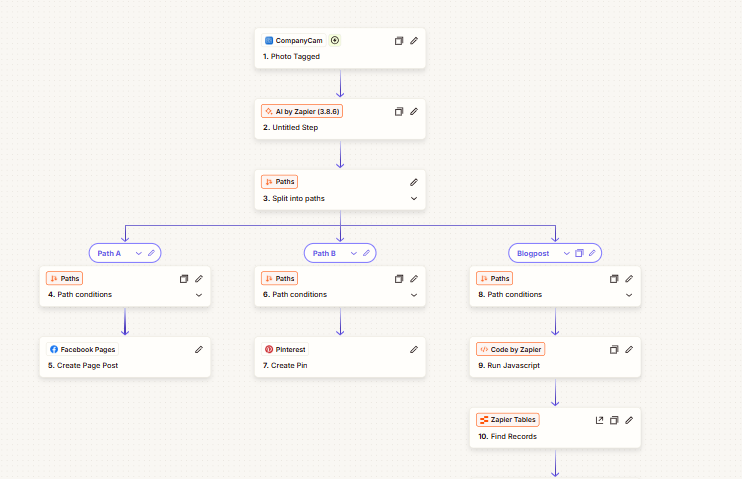
One trigger, three paths:
- Facebook Pages — an AI-generated caption becomes a page post.
- Pinterest — the photo becomes a pin.
- Blogpost — the heavier path: JavaScript shaping, a Tables lookup, the drafting agent writes a photo-backed post, the image is uploaded to WordPress media, and the post goes through the exact same draft-and-approval email flow as the keyword-driven posts.
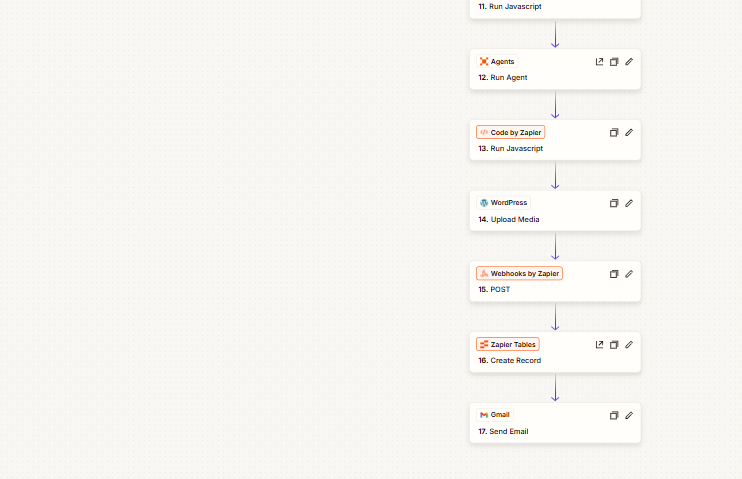
Real photos of real jobs in the client's actual service area — that's local content no stock-photo blog can compete with, and it costs the crew nothing beyond the tagging they already do.
What I took from this build
- Human-in-the-loop should not mean the human does work. The client's entire job is one tap. If your approval step requires logging into something, adoption will fail.
- Split automations at the human boundary. Durable state on one side (Tables), decision handling on the other (webhook + paths), nothing ephemeral holding the bag in between.
- Give the agent a data diet. Drafts grounded in Search Console and SEMrush data need far fewer corrections than drafts from a blank prompt — the approval rate is a function of the research layer, not just the writing.
- Autonomy is a spectrum, and the dial belongs to the client. The system is built so the approval gate could be relaxed later — but that's their call to make, not a default to ship.
The drafting agent has been running every weekday since February. The client's involvement: one email, one tap.